Claude Motion: What It Does, What It Costs From $40 a Month and How I Build These Videos Without a Team Plan
Last updated: November 6, 2026 · Plans and prices checked on claude.com that day
Claude Motion is a beta feature from Anthropic, announced on 8 October 2026. Claude builds short animations as code in the chat, you download them as MP4. No video model is involved, so there is no filmed footage and no people. Only Team and Enterprise plans get it. On your own you pay at least $40 a month, before tax.

As of 6 November 2026. Claude Motion is in beta. I re-read every Anthropic page quoted here on that day. I have not tested Motion myself, more on that below.
Table of contents
What is Claude Motion?
Claude Motion is a feature in Claude that turns your text into a short animation. You describe what you need in the chat, Claude builds the animation, and it plays like a short video. When you are done, you click Export and download an MP4 file. Anthropic announced Motion on 8 October 2026, together with Claude Dashboards. Both are still in beta.
Claude built the graphics in my video about Claude Motion, without editing software, without a designer and without a Team plan. How that works is further down.

The video for this article, in German, 7:40 minutes, as of late October 2026. The video only loads from YouTube (Google) after your click.
How does Claude Motion work?
Claude writes the animation as code. According to Anthropic's help article on Claude Motion, that code animates text, charts, shapes and images. Because it is all code, you can change a single word, a number or the timing, and everything else stays as it was.
Claude saves every animation automatically under Artifacts. That is the area in Claude where everything Claude has built for you is kept, so you can find it again later.
What can Claude Motion not do?
Motion does not create filmed footage or people. Anthropic's help article gives the reason: Motion does not use a video generation model. The way I picture it: Motion is a slide that moves, not a film that was shot.
In my video I use the three steps of my first call as an example. According to Anthropic, Motion can build a few words that move cleanly. It cannot show me sitting at a table with you.
What is Claude Motion meant for?
Anthropic gives three examples. A quarterly report becomes a 30-second explainer for an all-hands. A chart moves in a board deck. And new customers get a short walkthrough of the setup steps. So it is about your own content that you want to make easier to understand. In its announcement, Anthropic says Motion is built for explaining your own work.
Who gets Claude Motion?
Claude Motion is only available on the Team and Enterprise plans. Free, Pro, Max and Ultra do not include it. That is what Anthropic's pricing page says on 6 November 2026. I work with Max, so I do not have Motion.
| Plan | US page, per month, before tax | German page | Claude Motion |
|---|---|---|---|
| Free | $0 | €0 | no |
| Pro | $17 billed annually, $20 monthly | €15 annually, €18 monthly | no |
| Max | $100 | €90 | no |
| Ultra | $200 | €180 | no |
| Team (standard seat) | $20 per seat billed annually, $25 monthly, minimum 2 seats | €18 annually, €21.04 monthly | yes, on by default |
| Enterprise | $20 per seat plus usage, minimum 20 seats, annual only | same, shown in US dollars | yes, has to be turned on |
Source: claude.com/pricing, opened on 6 November 2026 in a US version and from Germany.
The most expensive plan for individuals, Ultra at $200 a month, does not include Motion. The Team plan does, and with two seats it starts at $40 a month.
How do you turn on Claude Motion?
On Team plans Motion is on from the start. On Enterprise plans it is off until an Owner turns it on in Organization settings > Artifacts, as Anthropic's help article describes. In Claude, the Owner is the person who manages the company account. On Enterprise, the Owner can also limit Motion to specific groups.
What does Claude Motion cost?
Motion has no price of its own. You pay for the plan it comes with. The cheapest way in is the Team plan, and that starts at two seats. According to the pricing page, a standard seat costs $20 a month billed annually and $25 billed monthly, before tax.
On your own, that means you pay for two seats:
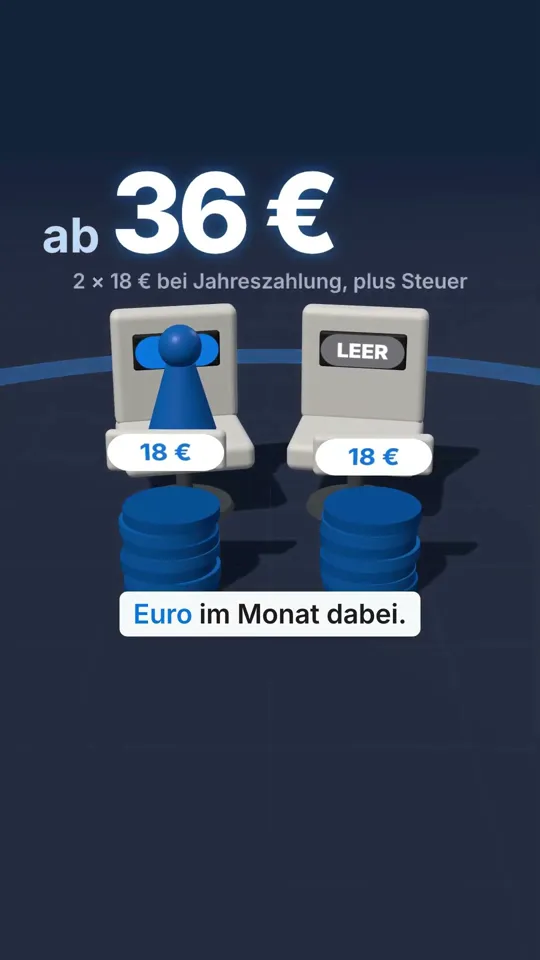
- Billed annually: 2 × $20 = $40 a month, or $480 a year, plus tax. From Germany: 2 × €18 = €36.
- Billed monthly: 2 × $25 = $50 a month, plus tax. From Germany: 2 × €21.04 = €42.08.
For comparison: Pro costs $17 a month billed annually. With Team you pay more than twice as much. In return you get two seats, and according to the pricing page each one has more usage than Pro. If you work alone, the second seat stays empty.
Does Claude Motion count toward my usage limit?
Yes. According to Anthropic, Motion counts toward your plan's usage limits like everything else you do with Claude. A longer or more complex animation uses more of it than a typical message. And according to Anthropic's page on usage limits, chat, Claude Code (the program Claude uses to work directly with the files on your computer) and the desktop app all draw from the same pool. If you animate a lot, you have less room left for coding or writing.
How do you make a video with Claude Motion?
On a Team or Enterprise plan you get to a finished clip in five steps. The details come from Anthropic's help article, the split into steps is mine.
- Ask for an animation: Ask for one in any chat. Or select Output in the message box and choose Motion. Or pick a Motion template in the Artifacts tab.
- Brief it: Say who will watch it, where it will play and roughly how long it should be.
- Attach your material: Attach the report, the numbers or the images. Then Claude builds the animation from your own content.
- Change it: Tell Claude in the chat what should be different, for example 'Slow down the second scene'. Or adjust it yourself in the editor.
- Export it: Click Export, choose MP4, and you get the file to download.
For my example the brief would read like this: the viewers are business owners thinking about booking a call. The clip will play on my website and run 20 seconds. I would attach the text of my appointment page.
Who can see my Claude Motion animation?
At first, only you can see it. You can share it with a link. On Team and Enterprise plans, though, that link stays inside your organization. Sharing outside only works once an Owner turns on external sharing. That is what Anthropic's page on Artifacts says. Anyone who wants to open a shared link also needs their own Claude account. For a clip on your website you need the MP4 export, not the link.
The short version in 45 seconds (in German):
The video only loads from YouTube (Google) after your click.
How do I build these videos without a Team plan?
I use Claude Code and a video tool that costs nothing for individuals and small companies. That is how every graphic on my YouTube channel is made, the channel I started after turning 40. I call it the open way. The principle is the same as with Motion: Claude writes the animation as code, and a program turns it into a video.
According to the pricing page, Claude Code already comes with the Pro plan. So you do not need a Team plan. I use Max myself, because I do a lot with it.
Which tools do I use, HyperFrames or Remotion?
I use both. I started with Remotion, a tool that turns program code into videos. It now holds 56 video templates and clips. Claude builds the videos for my channel with HyperFrames, including the one above.
HyperFrames turns HTML, the stuff websites are made of, into an MP4 video. There is a ready-made add-on for Claude Code, so Claude knows how the tool works. After that you tell Claude which video you want.
What do HyperFrames and Remotion cost?
- HyperFrames comes from HeyGen and is open source, meaning freely available code that anyone may use (Apache 2.0 license). According to its project page on GitHub there are no per-render fees and no thresholds for commercial use, and that includes large companies. Only the Studio app has a paid Pro plan with extra AI models from HeyGen.
- Remotion, according to its license page, is free for individuals and companies of up to three people. Bigger companies pay a license, for making their own videos $25 per seat per month.
How does a video move through my workshop?
For me it is a fixed workshop with five stations:
- Script: Claude writes it, I read it and sign it off.
- Voice: My voice clone reads the text, that is my own voice, rebuilt with ElevenLabs.
- Circle: The small circle you see me in is an avatar from HeyGen.
- Subtitles and video: Claude Code sets the subtitles word by word, and my server computes the finished video from it. That is called rendering.
- Upload: Claude uploads the video to YouTube as private. I publish it myself.
If I want to change a word in a graphic, I tell Claude, and Claude changes exactly that one line of code. Then the server renders the video again.
The workshop is one part of my AI system. What the other parts do, I show in five examples from my working day.
What is the catch with the open way?
You have to set it up once, and it takes a bit of technology. Claude Code works directly with the files on your computer, and rendering happens on a computer or server with HyperFrames installed. In return you get your own process with your look, and you do not need a Team plan. A cloned voice or an avatar comes on top, from providers like ElevenLabs or HeyGen, which have their own subscriptions.
What do I do if I need filmed footage or people in the video?
You can attach your own photos to Motion, and Claude builds them into the animation. Filmed scenes or people in motion come from a video model, and you lay text and graphics on top. In its announcement from 8 October, Anthropic itself says you can take a Motion animation further in Adobe, Descript, HeyGen, Higgsfield, invideo, Luma AI or Runway, with Canva and Captions coming soon.
I get my images straight from OpenAI, with my own account, no middleman in between.
What should you watch out for with free connectors?
Only put your access key into a program whose provider you know. There are free add-ons, so-called connectors, that link Claude to an image model. To use one, you paste in your access key, and your paid credit is tied to that key.
Which way fits you?
It depends on how often you need videos and whether you are already on a Team plan.
| Your situation | My advice | Why |
|---|---|---|
| You already have Team and need an explainer now and then | Claude Motion | built in, nothing to set up |
| You want regular videos for your brand, with your voice | the open way with Claude Code | your own look, no Team plan needed |
| You make videos really often | the open way plus fixed processes, like my five stations above | every step can be repeated |
| You need one video a year | have it made, for example by an agency or a freelancer | setting it up is not worth it |
If you work on your own, I would not book a Team plan just for Motion. For $40 a month you get Motion built in and have nothing to set up. With Pro for $17 and Claude Code you build your own process with your look, but you have to set it up once. Voice and avatar cost extra in my setup, and I work with Max because I do a lot with it.
If you want to know what a workshop like this could look like in your business, book a first call.
Frequently asked questions about Claude Motion
What is Claude Motion?
+
Claude Motion is a beta feature in Claude, announced on 8 October 2026. Claude turns your text and your material into a short animation that plays like a video. The animation is code, so you can change it in the chat or in the editor and download it as an MP4.
Can Claude make videos?
+
Yes, but Claude does not build filmed footage. With Claude Motion, Claude builds animations from text, charts, shapes and your images. It does not create people or realistic footage, because no video generation model is involved. Without a Team plan you can do the same with Claude Code and a tool like HyperFrames or Remotion.
Is Claude Motion included in Pro or Max?
+
No. According to Anthropic's pricing page, as of 6 November 2026, Motion is not part of Free, Pro, Max or Ultra. It is only available on the Team and Enterprise plans. In the sources I read, Anthropic gives no date for other plans.
How much does Claude Motion cost?
+
Motion has no price of its own, it comes with the Team and Enterprise plans. A Team seat costs $20 a month billed annually or $25 billed monthly, before tax, with a minimum of two seats. On your own you pay at least $40 a month. In Germany the page shows €18 and €21.04.
Can I use the Team plan on my own?
+
Yes, but you pay for at least two seats. The pricing page lists the Team plan for teams of 2 to 150. Billed annually that is $40 a month, billed monthly $50, before tax. In Germany it is €36 or €42.08.
How do I turn on Claude Motion?
+
On Team plans Motion is on by default. On Enterprise plans an Owner turns it on in Organization settings > Artifacts. Then you ask for an animation in any chat, or select Output in the message box and choose Motion.
Does Claude Motion use my usage limit?
+
Yes. Motion counts toward your plan's usage limits. According to Anthropic, a long or complex animation uses more of your limit than a typical message. Chat, Claude Code and the desktop app all draw from the same limit.
Is there a free alternative to Claude Motion?
+
The video tools are free for individuals, Claude Code is not. HyperFrames is open source and free for everyone, Remotion is free for individuals and companies of up to three people. Claude Code comes with the Pro plan, which costs $17 a month billed annually.
What would your video workshop look like?
In a 30-minute first call I look at your business and tell you honestly what I see. You leave with at least one clear next step. The call costs 199 euros.
maikschwede.de/en/appointment
Claude and Claude Motion are trademarks of Anthropic, HyperFrames is a project by HeyGen. This article is not affiliated with Anthropic, HeyGen or Remotion. As of 6 November 2026, plans and prices change.
Sources
All pages opened and read on 6 November 2026.
- Anthropic help center, 'Get started with Claude Motion' (how it works, no video model, plans, turning it on, steps, MP4 export, usage limit): https://support.claude.com/en/articles/17454997-get-started-with-claude-motion
- Anthropic, announcement of 8 October 2026 (launch, beta, purpose, taking it further in other programs): https://claude.com/resources/articles/dashboards-and-motion
- Anthropic, plans and pricing (Free, Pro, Max, Ultra, Team, Enterprise, opened in a US version and from Germany, before tax): https://claude.com/pricing
- Anthropic, Artifacts (who can see an animation, sharing on Team and Enterprise plans): https://claude.com/features/artifacts
- Anthropic help center, usage limits (one shared limit for chat, Claude Code and desktop): https://support.claude.com/en/articles/11647753-how-do-usage-and-length-limits-work
- HyperFrames on GitHub (Apache 2.0, no per-render fees, Studio app with a Pro plan, add-on for Claude Code): https://github.com/heygen-com/hyperframes
- Remotion, license and pricing (free up to three people, $25 per seat per month for bigger companies): https://www.remotion.dev/docs/license/pricing